

Testing 4 of the Best AI Tools in Excel: Surprising Results
Claude vs Copilot vs ChatGPT vs Tracelight, across five real world scenarios.
I put four of the best AI tools in Excel head to head on five real world scenarios, from financial modelling to data analysis. The point was to figure out which one is actually worth using day to day, and which ones you can skip.
The four tools are Claude, Copilot, ChatGPT, and Tracelight. I scored them on three things: how fast they got to an answer, how accurate that answer was, and how the final output looked once it was done. Each tool got the same prompt and the same source file. No special prompt engineering. Just see how they perform out of the box, because that's how most people use them.
The results were not what most people expect. You can watch the full breakdown with exact scores on the KenjiExplains YouTube channel, and this article walks through each scenario with the screenshots and what we learned.
Task 1: Extracting a balance sheet from a 10-K
First task: take Amazon's annual report (the full 90+ page PDF) and extract just theconsolidated balance sheet into Excel. Then calculate the current ratio, the quick ratio, debt-to-equity, and cash as a percentage of total assets, and put a small summary table underneath. Standard equity research warm-up.
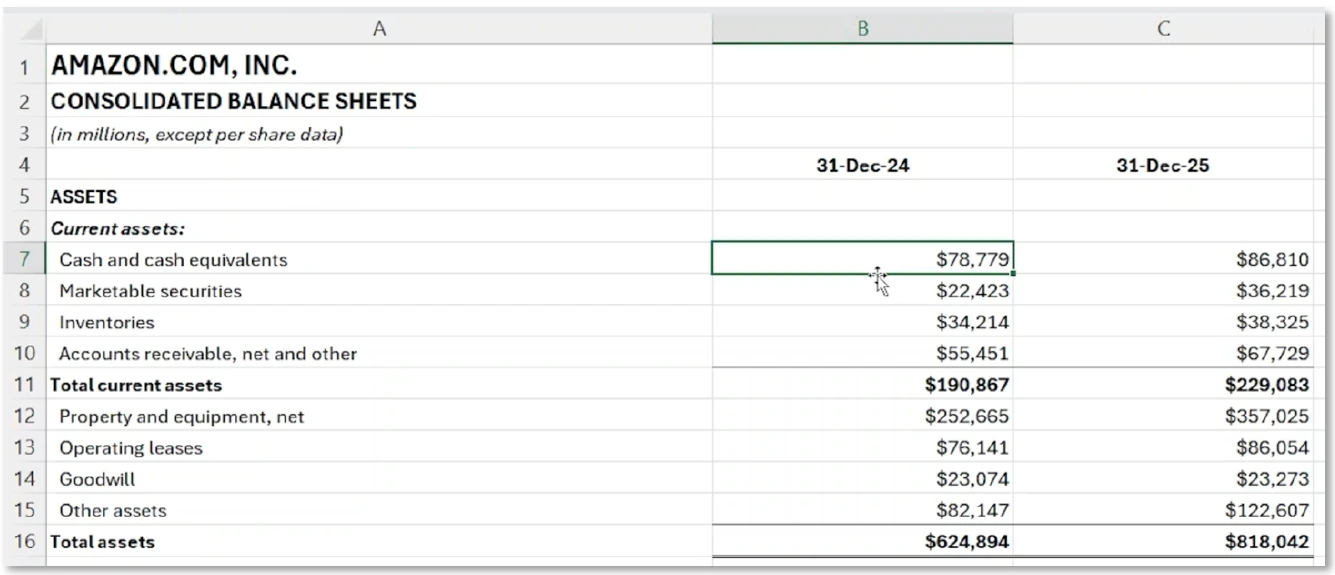
On speed, ChatGPT was the fastest by a long way at 47 seconds. Tracelight came in at1:37, Copilot at 1:18 (after I had to retry it, more on that in a second), and Claude was actually the slowest at 2:45. So speed alone doesn't tell you much. Here's how the outputs compared.
Claude got the numbers right. The problem was that the subtotals (total current assets, totalassets, and so on) were hardcoded instead of being SUM formulas. In a real model that's a problem because the second you change a line item the totals don't update, and you don't know it. The ratio table on the bottom was formatted reasonably, with the multiples shown with an X next to them, so the presentation was decent overall.
Tracelight was the cleanest of the four. It had that classic corporate look, with darker headers and lighter totals, and it used real formulas for the subtotals instead of hardcoded numbers. The ratio table at the bottom kept the same formatting as the balance sheet up top, which Claude hadn't done. Of the four, this was the closest to something I'd put in front of a manager without touching it.
ChatGPT also looked pretty solid, especially the ratio table at the bottom. But like Claude,the subtotals were hardcoded. I'd put it slightly ahead of Claude on this one because the formatting was a bit tighter, especially on the ratios.
Copilot was the most tedious to run. Its edit mode (the one that actually lets it touch thefile you're working in) just didn't work, so I had to switch over to chat mode, which can only create a new file rather than edit the existing one. When it finally produced something the formatting was off, the numbers were highlighted in blue for no obvious reason, and the calculations weren't formulas. Notgreat.
Winner on this task: Tracelight. ChatGPT a strong second, mostly on speed. Claude third,Copilot last.
Task 2: Finding the differences between two Excel files
Task two is one of those scenarios that comes up all the time in real work. Someone sends you an updated version of a file and you have no idea what they actually changed. I gave each tool two Excel files that looked nearly identical and asked them to find the differences.
Three things were different between the two files. One had an extra row. A few values were missing. And the order date column was using formulas in one file and hardcoded values in the other (which is the kind of thing you can never spot by eye).
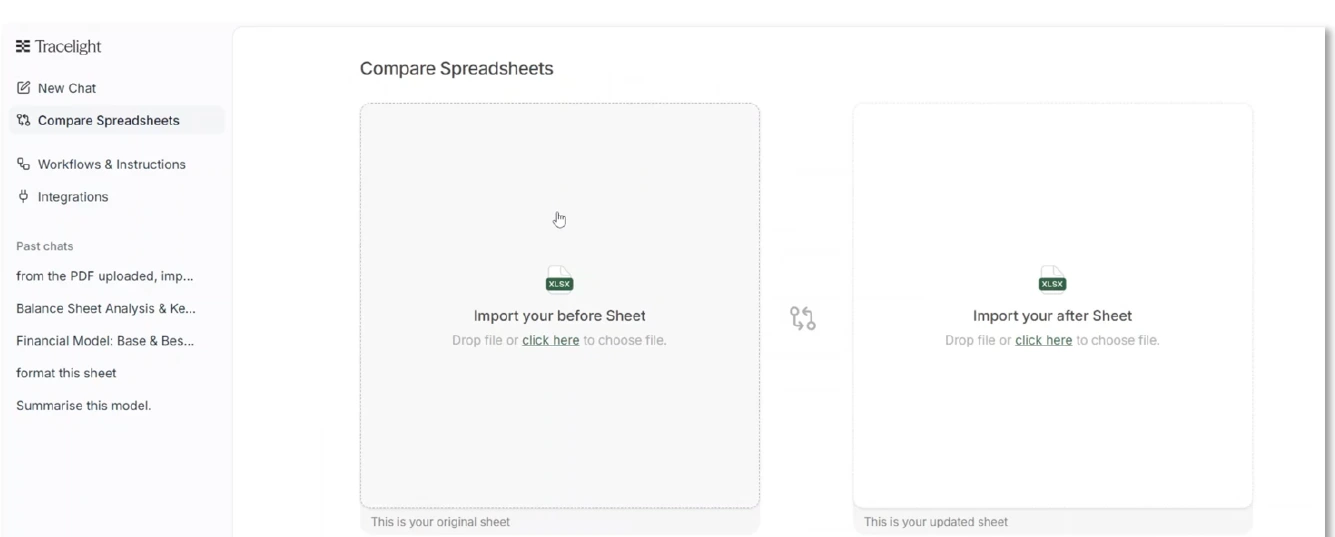
On speed Tracelight was in a league of its own at two seconds, because it has adedicated tool for exactly this. You drop in both files, click compare, and it shows you what changed, what was there before, what's there now, and a short summary. That's it.
Claude did avery good job on accuracy. It spotted everything and explained what had changed clearly. The only thing I'd have liked was to actually see the two datasets side by side instead of just the written explanation. It took 2:28.
ChatGPT took adifferent approach and showed me both versions side by side, which I actuallyliked. The downside was that the actual list of differences came back in thechat rather than in the Excel file, so you can't really work from it. It camein at 1:03.
Copilot (1:34)was the weakest result. The table and summary it produced were hard tointerpret. You couldn't tell at a glance what was actually different.
All four got the accuracy basically right on this one, which won't be true once we get tothe harder tasks. On presentation, Tracelight wins because it literally has a tool for it. Claude and ChatGPT I'd put at the same level. Copilot last.
Task 3: Scenario analysis
Task three: I gave each tool a sheet of assumptions with a best, base, and worst case formonthly recurring revenue growth, and asked it to build a 12-month income statement forecast that lets me toggle between the three scenarios. So I neededa working dropdown, not three separate tables.
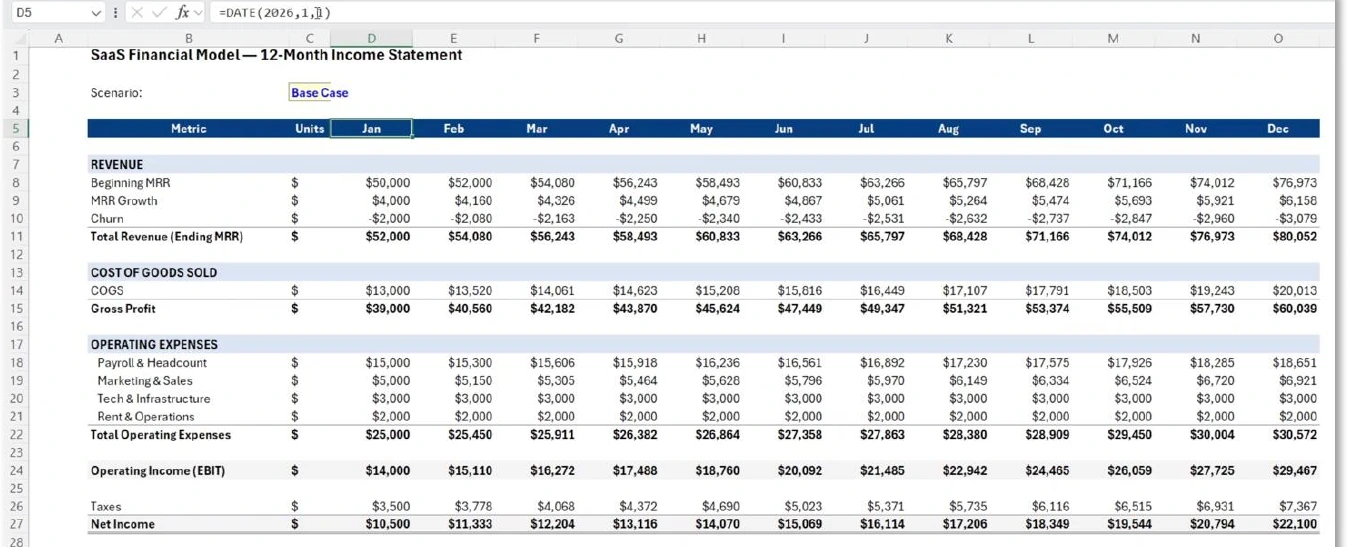
ChatGPT was the fastest yet again at 43 seconds, ahead of Tracelight (2:36), Claude (4:50), andCopilot which took a full eight minutes. But on this task, fast and broken isworse than slow and correct, and that's exactly what played out.
Claude looked really promising. The formatting matched the assumptions sheet without measking, and the scenario toggle had all three options the way I wanted. Small issues: it carried the assumptions over into the new sheet, which I didn't really need since they're already on the first sheet, and there was a small formatting hiccup on the right where it left a few cells in blue.
Tracelight was very close to Claude on quality. The formatting was clean, it removed the gridlines, and importantly it didn't assume a starting month. It used "month 1" instead of January, which I prefer because nothing in the prompt said the forecast should start in January. It also used the EDATE function for the dates, which is the right way to handle that. Overall the layout was a touch nicer than Claude's, and it got there about two minutes faster.
ChatGPT was the fastest but the model didn't actually work. When I changed the scenario, the calculations broke (it looked like a quotation-marks issue in the formulas).There was also a "selected case" column I hadn't asked for and didn't really understand. Speed doesn't help if the output is broken.
Copilot was the slowest by a wide margin at eight minutes, and like ChatGPT it assumed astarting date. It also started at month zero rather than month one, which means revenue started at $50K instead of growing from there. That's defensible (depends how you read the prompt) but I'd have preferred either an explicit highlight on net income, or at least a border or formatting on subtotals likegross profit. It was a working model, though, which is more than ChatGPT delivered.
Tracelight and Claude were roughly tied on accuracy and aesthetics, but Tracelight got there two minutes faster, so it wins this one. Claude second. Copilot a slow but functional third. ChatGPT last because the model didn't work.
Task 4: Spotting errors in a financial model
Task four isthe classic "a colleague just sent you this model, make sure it doesn'thave any errors." I planted some hardcoded values where formulas should be, plus a couple of formula bugs, and asked each tool to check it.
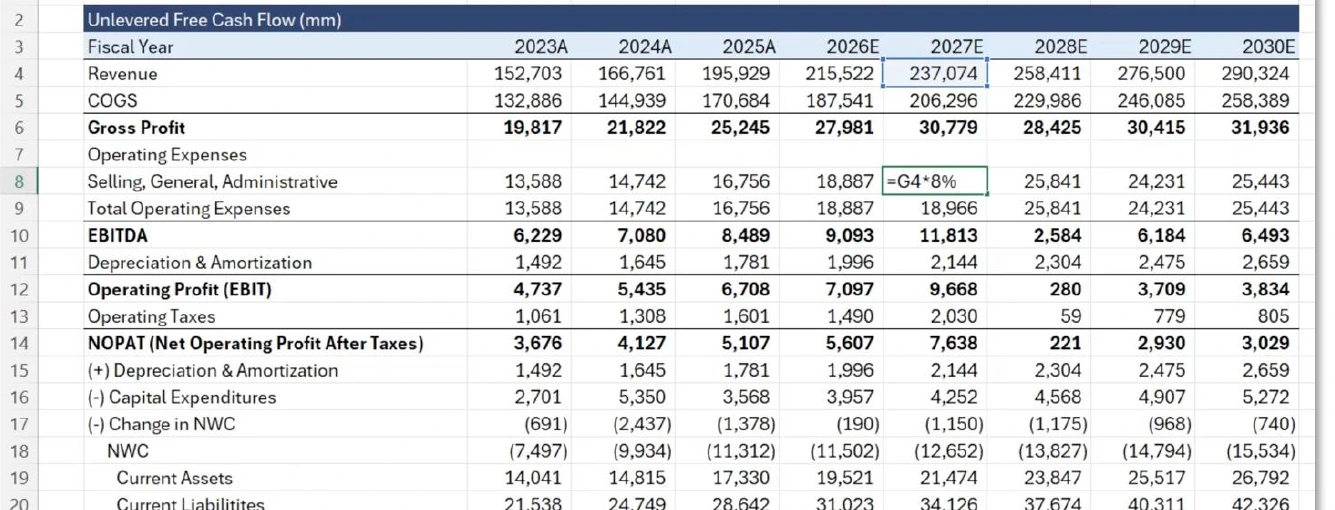
Speed is hard to compare cleanly on this one because Copilot just couldn't produce an answer at all. After ten minutes of waiting I stopped it. ChatGPT was the fastest of the rest at 34 seconds, then Claude at 2:04, then Tracelight at 3:31.
Claude has abuilt-in audit feature, so I used it. It found all the issues, which is the important thing. The problem was the layout it gave me. Everything came back in a long, dense list that was hard to actually read. Accurate, but the presentation made the output harder to use than it needed to be.
Tracelight also has a built-in audit feature, and it's the most visually solid of the four. It runs live checks in the background, and when you actually run a full audit it gives you a clear explanation of each issue plus a trace button that takes you to the exact cell. The one thing that was a bit annoying is that you have to doit on a sheet-by-sheet basis rather than across the whole workbook in one go.
ChatGPT spotted the errors quickly and was the fastest of the four. The catch: it just went ahead and made the edits rather than asking. My prompt was to check the modelfor errors, not fix them. That's a meaningful difference. In real work you want to review what's wrong before you let anything change the file.
Copilot effectively froze. After ten minutes it still hadn't produced anything, so I called it.
ChatGPT wins this one for being fast and accurate, with the caveat that it auto-edited the model without asking. Tracelight and Claude follow closely behind on accuracy,with Tracelight ahead on presentation. Copilot didn't finish.
Task 5: Datamanipulation and analysis
This was the hardest task by a long way. I gave each tool a real dataset of World Cupmatches going back to 1930 (one row per match, with separate home_team andaway_team columns) and asked it to do four things:
First, unpivot the data into one row per team per match, so when Argentina plays France there's also a row showing France played Argentina. Otherwise you can't count how many games each team has actually played. Second, build three pivot tables on a separate sheet: top 10 teams by win percentage (minimum 10 matches),average attendance per year, and total goals per round. Third, add slicers for year and round connected to all three pivots. Fourth, format win % as a percentage with one decimal and highlight the top three teams in gold, silver,and bronze.
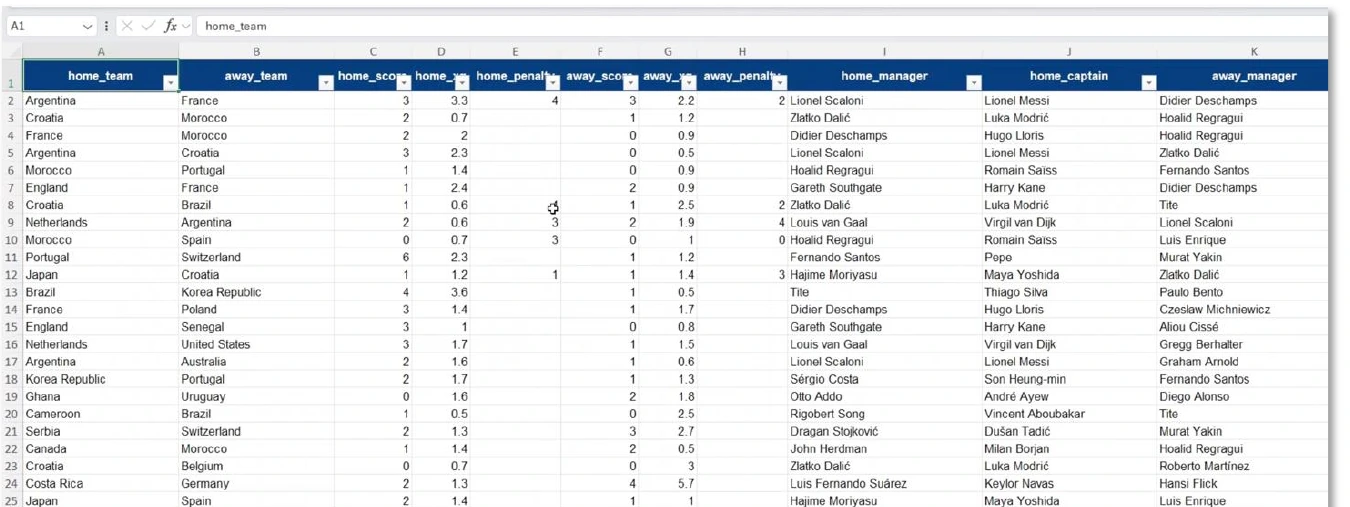
On speed, ChatGPT was the fastest again at 2:08, then Tracelight at 6:34, then Claude at 9:23, and Copilot at 12:33. This is the task that really separated the tools.
Claude did the team records part well, but the analysis was incomplete. The "top 10" pivot was actually a full list rather than a top 10, and the slicers were missing entirely. Also, if you're showing a top 10 it should be sorted best to worst, which it wasn't.
Tracelight did the full job. Team records were fine, the analysis sheet had a proper top 10, all three pivot tables, the slicers, and the gold/silver/bronze formatting was applied to the right cells. The one nit pick is the same as Claude: I'd have liked the win % column sorted from highest to lowest by default. But it actually did what I asked, which is more than the other three managed.
ChatGPT was asurprise here in a few ways. The team records looked fine. The analysis sheet looked best at first glance, and it was the only one that sorted the win % column from high to low. But then I realised it wasn't actually using pivottables, it was just hardcoded data. It also seemed to skip several rounds (group stage was missing) and there were no slicers. Aesthetically the best, technically not what I asked for. ChatGPT has a pattern of giving you an answer that looks right whether or not it actually is.
Copilot's team records were fine, but the analysis sheet threw a spill error. That error happens when data lower down in the sheet blocks a dynamic array from spilling.All it needed to do was move the lower pivot tables out of the way, which it didn't. The slicers were also missing.
Tracelightwins on accuracy because it's the only one that actually delivered everything Iasked for. On pure aesthetics ChatGPT was the nicest looking, even though it skipped the pivot tables. Claude third. Copilot last with the spill error.
Final scores
Pulling it all together, here's where each tool ranked across the five tasks:
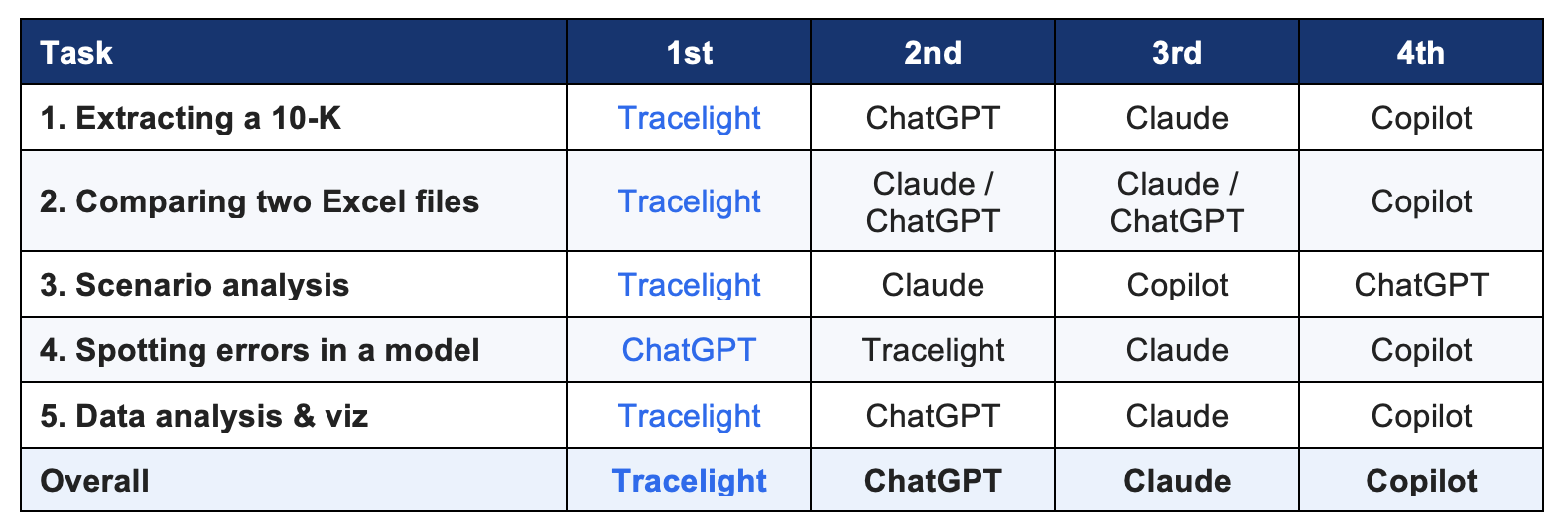
Copilot was the worst performer overall, which I genuinely didn't expect going in. It's the one that should have a structural advantage because it's native to Excel and has full workbook access by default, and it still came last on four out of fivetasks and didn't finish the fifth.
Claude landed third, which is a bit surprising and is mostly because ChatGPT is just so much faster, even when the output is less reliable.
ChatGPT was second. Excellent on speed and on focused tasks like the DCF audit, but the pattern that kept showing up was producing something that looked right but wasn't actually right. The broken scenario model and the hardcoded "pivottables" in task 5 are both examples of that.
Tracelight won. Not because it was the fastest, but because it was the only tool that actually delivered everything I asked for on every task. On finance-specific work like the modelling and the audit it also had a real edge from being built for thats pecifically (the Compare Spreadsheets tool and the live audit features in particular).
One more thing
Five tasks isn't everything. Different tools are better at different things, and you should pick based on what you actually do. Claude and ChatGPT are generalist models, so they also work outside Excel as full web-based assistants. That's real versatility you don't get from Tracelight, which is more narrowly focused on Excel and finance work. If you're doing all kinds of stuff across all kindsof tools, you'll still want one of the generalists in your stack.
If you spend most of your day in spreadsheets though, especially on models and audits,Tracelight is the one I'd add. Worth noting too that they're the only tool of the four with a free tier inside Excel, so you can try it without committing toanything.
Try Tracelight
Tracelight tookthe win across the five tasks and they have a free tier you can try inside Excel. Have a look at tracelight.ai. The full video walkthrough with all the timings and on-screen comparisons is on the Kenji Explains channel.
This article is sponsored by Tracelight. The testing and the scoring are unchanged from what I'd have written without the sponsorship.


Ready to Level Up Your Career?
Learn the practical skills used at Fortune 500 companies across the globe.